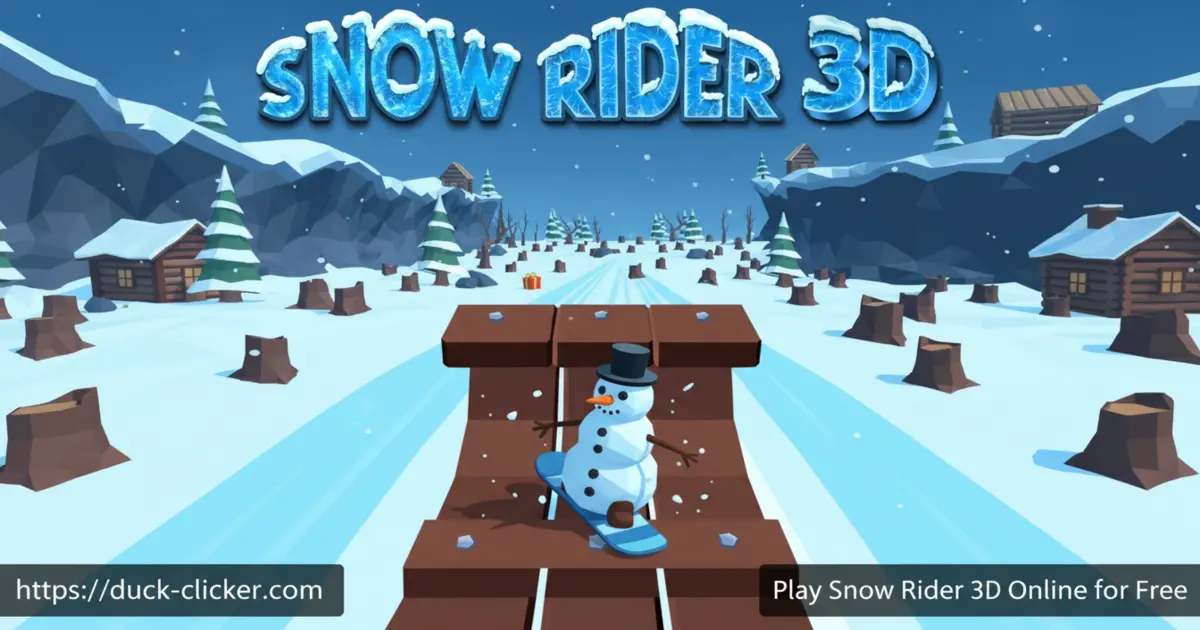
Play Snow Rider 3D Online for free! Jump onto a speedy sled, zoom down an endless snowy mountain, and try not to crash as the world whizzes by. This Snow Rider 3D free game turns every run into a new winter adventure, packed with rolling snowballs, wobbly snowmen, and sneaky trees just waiting to bonk your sled. Collect colorful gifts, unlock cool new sleighs, and chase your best distance again and again. You can play at home, on a laptop at school, or on your phone or tablet whenever you have a spare minute. Get ready to slide, dodge, and laugh every time you play ❄️
- Fast, simple sledding gameplay anyone can learn in seconds
- Endless snowy slopes that change every run
- Lots of sleds to unlock using the gifts you collect
- Works in the browser or as a mobile app for quick play sessions
What is Snow Rider 3D?
Snow Rider 3D is a fast, endless downhill sled game where you race through a bright winter world and dodge everything in your way. The browser version was first made popular by Hooda Math and other arcade sites, and the official mobile version was developed by Ashima Prabhakar. Instead of levels, you ride one giant mountain that keeps generating new jumps, cliffs, and obstacles the farther you go. Your goal is simple: stay alive, grab as many gifts as you can, and beat your own high score.
Snow Rider 3D Gameplay
Each run in Snow Rider 3D starts with your sled at the top of a huge snowy slope. The sled moves forward on its own, so you only focus on steering, jumping, and surviving. Use quick left and right moves to weave between trees, rocks, cabins, and giant rolling snowballs while aiming your sled toward glowing gift boxes. These presents are your in-game currency for unlocking new sleighs. Fans often look for Snow Rider 3D unblocked or Snow Rider 3D Classroom 6x so they can enjoy the same fast, simple gameplay at school without installs.
Graphics and Sound
The 3D graphics are clean and bright, with smooth snow, chunky trees, and cozy wooden houses that make every run feel like a holiday postcard. As you speed up, the world blurs just enough to make the ride feel intense but never confusing. Sound effects add to the thrill: the soft crunch of snow, the rush of wind, and cheerful jingles when you grab gifts. On mobile, gentle haptic vibrations can make crashes and big jumps feel even more exciting 🎄
Levels and Progression
Snow Rider 3D doesn’t use fixed levels. Instead, it’s an endless runner: the farther you go, the trickier things get. At first, you slide past wide gaps and slow obstacles. Later, you’ll face tighter paths, faster snowballs, falling trees, and sharp drops that demand perfect timing. Your progress shows up as your best distance and total gifts collected. Over time, you’ll unlock lots of different sleds, so every run feels a little fresh, even on the same mountain.
Customization and Sled Unlocks
One of the most satisfying parts of Snow Rider 3D is unlocking new sleighs. Gifts you collect during runs can be spent in the sled shop to buy fun designs like Santa sleds, round sleds, ancient wooden sleds, shiny chroma sleds, and more. None of them breaks the game, but each gives your ride a new style and a reason to keep collecting presents. Many players set mini-goals like “unlock three new sleds today” instead of just chasing distance.
Achievements and Rewards
The mobile version of Snow Rider 3D adds tons of achievements for doing cool things: reaching certain distances, collecting streaks of gifts, surviving tough obstacles, or completing daily tasks. These challenges make even short play sessions feel rewarding. Some achievements also reward extra gifts, helping you unlock sleds faster without spending real money.
Why Players Love Snow Rider 3D
Kids and teens say they love Snow Rider 3D because it’s easy to start but hard to master. A single run can last just a few seconds or several intense minutes, so it’s perfect for study breaks. Many reviewers also mention that sliding down snowy hills helps them relax when they’re stressed. Because rounds are quick and the controls are simple, it’s great for friendly competitions with siblings or classmates to see who can set the best score.
Snow Rider 3D Mobile & iPad Experience
If you like playing on the go, the official Snow Rider 3D mobile app is a great option. Tilt or touch controls make steering feel smooth on phones and tablets, and it runs well even on older devices. Players searching for Snow Rider 3D mobile or Snow Rider 3D iPad can download the app from the official stores, then enjoy the same addictive sledding experience offline or online.
Snow Rider 3D at School and Classroom 6x
Many students discover the game through school-friendly portals and look up Snow Rider 3D Classroom 6x or Snow Rider 3D Google Classroom. On kid-safe gaming sites like Duck Clicker, you can load the browser version in just a few seconds and start playing between lessons, if your teacher allows it. There’s nothing to install, and runs are short enough that you can stop instantly when it’s time to focus again.
Platform
You can play Snow Rider 3D directly in your web browser on desktop, laptop, tablet, or mobile.
How to Play Snow Rider 3D?
Learning how to play Snow Rider 3D is super quick. As soon as the run starts, your sled begins sliding downhill by itself. Your job is to steer around trees and rocks, dodge snowmen and snowballs, and grab gifts without wiping out. Move gently instead of jerking the sled, and stay near the middle of the slope so you have room to escape danger. Whether you play Snow Rider 3D online in a browser or in the app, the basic idea is the same: survive as long as you can.
Instructions and Controls
- W / ↑ – Jump with your sled or lean forward on ramps
- S / ↓ – Crouch slightly and line up safer landings
- A / ← – Steer left
- D / → – Steer right
- Space – Jump or continue after a crash screen
- R – Restart the current run quickly
Tips and Tricks for Snow Rider 3D
- Stay near the center of the slope so you have space to dodge obstacles from both sides ⛄
- Look far ahead, not just at your sled, so you can plan paths around trees and cabins.
- Only jump when you really need to clear small stumps or gaps; unnecessary jumps cause crashes.
- Don’t grab every gift box if it feels risky—surviving longer usually earns more presents overall.
- Use the sounds of rolling snowballs and wind as clues that something dangerous is coming 🎧
Features of Snow Rider 3D
- Endless downhill sled runs with rising speed and difficulty
- Festive 3D winter world full of trees, cabins, snowmen, and snowballs
- Simple keyboard or touch controls that are easy for kids to learn
- Lots of colorful sleds to unlock using gifts you collect
- Playable in a browser or app and completely free to start
Snow Rider 3D Online
When you play Snow Rider 3D online, you don’t need to download anything first. Just open the game page on Duck Clicker, press play, and your sled launches down the hill in seconds. Online play also means you can switch between devices easily and try to beat your scores wherever you log in.
Snow Rider 3D for Free
Snow Rider 3D is a free game to start on both the web and mobile. You can enjoy endless sled runs, unlock sleds with in-game gifts, and chase new records without paying. Some mobile versions offer optional ads or in-app purchases, but you never need to spend money just to enjoy the core snowy adventure.
Download Snow Rider 3D
On Android
Download on Google Play to get the official Snow Rider 3D download for Android phones and tablets.
On iPhone or iPad
Download on the App Store to install Snow Rider 3D on iPhone or iPad and keep sledding on the go.
APK Snow Rider 3D
If you’re thinking about searching for a Snow Rider 3D APK, it’s safer to skip random files from the internet. Instead, always use the official Snow Rider 3D download from Google Play or the App Store so you know the game is clean and up to date.
On PC
On PC or laptop, the easiest way to enjoy Snow Rider 3D is in your browser. You don’t need to install a launcher or sign up. Just visit Duck Clicker in any modern browser, start the game, and control your sled with the keyboard.
Can You Play Snow Rider 3D Unblocked?
Many kids search for Snow Rider 3D unblocked so they can play at school or in the library. On Duck Clicker, the game runs straight in the browser with no extra software, so it works like other unblocked games. However, every school sets its own rules and filters, so always follow your teacher’s instructions and only play when it’s allowed.
Snow Rider 3D Unblocked 76
If you’ve seen Snow Rider 3D Unblocked 76 on other sites, you’ll get a very similar experience here: fast loading, smooth 3D graphics, and no need to log in. As long as your network doesn’t block gaming sites, you can race down the slopes in just a few clicks.
Snow Rider 3D Extension
Some players like using a browser extension to open their favorite games even faster. When an official Snow Rider 3D extension appears in your browser’s web store, you can install it from there and launch the game with a single tap.
Similar Games to Snow Rider 3D
If you’re a fan of Racing Games, you’ll definitely enjoy these too:
FAQs About Snow Rider 3D
What is the main goal in Snow Rider 3D?
Your main goal is to steer your sled safely down the mountain for as long as possible. Avoid every obstacle, collect gifts when it’s safe, and try to beat your best distance and score.
How do you control the sled in Snow Rider 3D?
On a computer, you steer with the arrow keys or WASD and use jump when you need to hop over small gaps or stumps. On mobile, you either tilt your device or tap on-screen buttons, depending on your settings.
Can I play Snow Rider 3D on my phone or tablet?
Yes. You can enjoy Snow Rider 3D mobile in two ways: play in your browser, or install the official app from Google Play or the App Store. It runs smoothly on most modern phones and tablets.
Is Snow Rider 3D good for my grade level?
Snow Rider 3D is simple enough for younger kids to understand but still challenging for older players. There’s no hard reading, and the controls are easy to use, so it fits learners from elementary through middle school.
Does Snow Rider 3D save my progress?
Your highest scores and unlocked sleds are usually saved on your device or in your browser. If you clear your data or switch devices, your progress may reset, so try to keep playing on the same device if you care about records.
Is Snow Rider 3D free to play?
Yes. Playing in the browser is completely free, and the mobile versions are also free to download. Some versions may show ads or offer optional purchases, but you never have to pay to enjoy the main game.
How does Snow Rider 3D help with skills and learning?
Snow Rider 3D secretly trains your brain while you play. It boosts hand–eye coordination, quick decision-making, focus, and timing. Teachers like that games like this can also encourage persistence, because you learn from each crash and try again.
Why is Snow Rider 3D sometimes blocked at school?
Some schools block all gaming sites to keep students focused. If Snow Rider 3D is blocked on your network, you might see error messages instead of the game. In that case, only play at home or on networks that allow gaming.
Can I share Snow Rider 3D with my friends or class?
Definitely. You can invite friends to play on their own devices and challenge them to beat your best score. Some teachers even add links like “Snow Rider 3D Google Classroom” to share fun reward games after lessons.
Is it safe to use Snow Rider 3D GitHub files?
Some players search for Snow Rider 3D GitHub to find game files, but downloading random code can be risky. It’s much safer to play in your browser on trusted sites or install the official apps from Google Play and the App Store.
What can I do if Snow Rider 3D feels too hard?
Start by steering more slowly and ignoring tricky gift boxes until you’re comfortable dodging obstacles. Watch how the snowballs roll, practice short runs, and remember that every crash teaches you what to avoid next time.
How can I reset Snow Rider 3D?
On the browser, you can refresh the page or clear your game data to start fresh. On mobile, you can reset progress from your device settings or by reinstalling the app, but you’ll lose unlocked sleds and scores.
Conclusion
Snow Rider 3D turns a simple idea—riding a sled down a snowy hill—into an exciting challenge you’ll want to replay all winter long. With easy controls, endless slopes, and tons of sleds to unlock, it’s perfect for quick breaks and friendly score battles. Strap in, dodge those snowmen, and hit play to start your next high-speed run today!